Monday, January 18, 2016

How to Reset An Epson Ink Cartridge Chip To Refill The Ink Cartridges


How to Reset An Epson Ink Cartridge Chip To Refill  The Ink Cartridges


Few things are more frustrating than refilling the ink cartridge for an Epson printer and then having the printer refuse to recognize that it now has ink when attempting to print from a computer. Many owners of Epson printers become frustrated and end up either purchasing Epson ink cartridges or giving up on the printer altogether. Neither of these options is palatable. Fortunately, there is a way to reset an Epson ink cartridge chip so that the printer recognizes the refilled ink cartridges.


What the Epson Ink Cartridge Chip Does

The ink cartridge chip is a special feature in Epson original equipment ink cartridges that notifies the printer of the cartridge's status. When the ink cartridge is empty, the chip conveys that information to the printer. Consumers who refill these cartridges with ink refill kits on their own find that the printer does not recognize that the cartridge is no longer empty. The printer only recognizes fresh ink when a brand new Epson ink cartridge enters the print head. The other option is to use alternative methods to reset the ink cartridge chip.

Four Colors (C M Y BK)Compatible Cartridge Ink Chip for Epson

Resetting the Epson Ink Cartridge Chip With Software
A freeware program called SSC Service Utility enables users to download and install software that helps to manage their Epson printer. The software offers several functions, one of which is resetting the ink cartridge chip. Other settings allow users to freeze the internal ink counters or to reset the internal ink counters. It supports over 100 Epson printer models, but some printers may not respond to the commands from the software. You can also use Cracked Cartridge Chip if you don't know how to use the software.


Using a Cartridge Reset Tool

Reset Ink Chip Cartridge for EPSON7900/9900/7910/9910 Maintenance Tank 
A cartridge reset tool is a small plastic piece that fits against the cartridge. The contacts on the reset tool correspond to the contacts on the printer's ink cartridge. When connected to the ink cartridge, the cartridge reset tool indicates the resetting of the ink cartridge with a green LED light. The reset tool is beneficial not just for resetting the chip, but also for allowing the printer to use all of the ink in the cartridge.

How To Reset an Epson Ink Cartridge Chip With a Cartridge Chip Reset Tool


Troubleshooting Issues With the Reset Tool

Buyers should be sure to check the description for each reset tool carefully to determine whether they can reset their Epson printer cartridge with the tool. If the wrong cartridge is attempted or the reset tool is simply unable to reset the cartridge, users see either a red LED light or no light at all. In some cases, they simply cannot reset the chip any further. Before disposing of a reset tool, always test it on multiple ink cartridges.
 
Purchase Other Ink Refills
 One-time Cartridge Chip Ink Compatible for EPSON4900/4910
The Epson ink cartridge reset chip is only a problem when using genuine Epson ink cartridges. If users wish to avoid problems with the chip altogether, then another option is to purchase printer refill ink cartridges that are equivalent to the Epson versions, but made by other companies. These cartridges are often less expensive than Epson original equipment and the chips within them reset automatically.


How To Reset Your Cartridge Chip By Swapping Cartridge Chips


Warnings When Refilling Epson Ink Cartridges

Buyers who want to avoid refilling Epson ink cartridges on their own may want to simply purchase non-OEM ink cartridges. This way, resetting the chip is not a concern at all and the printer reflects full ink levels each time they insert a new ink cartridge. A very few Epson printers cannot have their ink cartridge chips reset. These models include:
Stylus C41
Stylus C42
Stylus C61
Stylus C62
Stylus C82
Photo 830


How to Buy Items to Reset an Epson Ink Cartridge Chip Online
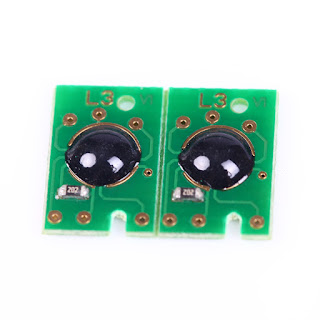
One Time Ink Chip For Inkjet Sure Color F6070 Printer Ink Cartridge CMYK

If you need to reset an Epson ink cartridge chip, make sure you get exactly what you need to do the job properly. Type the name of the item that you need into the search bar on any website page . From there, sort the listings accordingly and be sure to read the descriptions carefully.

The descriptions are particularly important for items such as the cartridge reset tool, since each works with specific models of Epson printers. To purchase replacement ink cartridges, search for your printer's model number and "replacement ink chip."


Follow Us:


Friday, January 15, 2016

Advantages and Disadvantages of Dye Sublimation Printing on Fabric Banners


Dye Sublimation Printer For Outdoor Advertisement Fabric Banner Printing

Dye sublimation printing is, by definition, the sublimating of dye in fabric. The way it works is like this. First, a transfer paper is printed on a digital printer that is set up with CMYO dye cartridges rather than your typical CMYK inks. CMYK, or four color process printing (4CP is the shorthand version of CMYK which stands for cyan-magenta-yellow-black) is used in surface printing of materials, including direct-to-fabric printing, but does not become part of the fabric like dye sub printing does.
Dye Sublimation Printer For Outdoor Advertisement Fabric Banner Printing Using  Sublimation Paper And Dye  Ink
Dye sublimation uses dyes, as I said, and a CMYO dye cartridge set that replace the black in CMYK printing with an "Overprint Clear." The inkjet printer that is set up to print dyes (this cannot be done interchangeably without a significant amount of know-how and expense, so once a printer is set up to print dyes, it is usually not converted back to standard CMYK inkjet printing) prints a mirror image of whatever it is that needs printed on a treated dye-accepting paper known generically as "transfer paper."

This paper is now "married" to a piece of polyester or another synthetic fabrics (polyester is the most common due to its versatility in look and usage - from stretchable trade show booth fabrics to garments to outdoor flags and a whole lot more) and then it is fed through heated rollers that combine heat - about 375°F or 210°C - with pressure to expand the cells of the fabric and convert the dye to a gaseous state.
The sublimation jumbo roll paper is used for banner/ flag/ shopping bag printing. It can save inks and improve production efficiency.
The dye is sublimated into the open pores of the polymeric synthetic material, and as it cools again, traps the sublimated dye within the cells of the fabric. Because the dye became gaseous, it does not create a dot pattern during the sublimation process like inkjet printing will on fabric or vinyl or other rigid plastic substrates, rather it creates a continuous tone print much like how photographs are developed and look.

So, now that I've explained the basic difference between dye sublimation printing and inkjet printing, I'll address the original question of the advantages or disadvantages of both. As you may know, I don't think there's a lot of disadvantages to dye sublimation printing on fabric, but I'll give you the two that I can think of off the top of my head. First, it is slower than inkjet printing because you have two processes in the heat transfer part of dye sublimation, so labor costs are going to be higher to some degree, although there are now printers that have the fabric and paper inline and they are drawn into the heated rollers as the printer continues to print.
Sublimation Jumbo Roll Paper Used For Banner/ Flag/ Shopping Bag Printing Save Inks And Improve Production Effieciency
The second disadvantage is also a production issue that is being solved by the newer printer/roller units just explained in the previous paragraph. In the past, and still in the present, it is not uncommon for the fabric to get a crease or wrinkle in it, or the paper, and suddenly the whole transfer print and piece of fabric are ruined. You would have to start over. Many of those who have been at this for awhile and are using older equipment charge higher prices per square foot for wider material, but many also don't who have the newer equipment.
High Quality Digital Printing Machine Using Sublimation Paper Inkjet Ink
As far as advantages, I talked about the continuous tone printing that creates brighter and smoother color variations and transitions than you'll find with inkjet printing, and a superior overall look, in our opinion. Also, because the dye impregnates or is sublimated in the fabric, it is permanent and cannot flake off like some types of ink will, particularly garment inks used for t-shirts or inks printed on rigid substrates. So, durability and appearance are probably the best examples of the superiority of dye sublimation printing of fabric or garments.


Follow Us:


Wednesday, January 13, 2016

How Digital Textile Dye Sublimation Printing Is Changing Fashion

It’s an exciting time for fashion, with the new technology of digital textile printing make virtually anything possible! Through digital textile printing, you can achieve new levels of precision, and creative expression.
Textile Digital Printing Wide Fomat Dye Sublimation Paper for MImaki

How Does It Work?
Digital textile printing is ink-jet technology that can print designs directly onto a garment, a t-shirt or dress for example, or can be used to produce larger quantities of fabric. It’s similar to an ink-jet paper printer, really!
In the past, rotary screen printing was used to produce large quantities of printed fabric. In rotary screen printing, each run usually produces several thousand yards of printed fabric. One of the advantages of digital textile printing is the ability to make smaller runs.
Textile Digital Printing Sticky Adhesive Glossy Dye Sublimation Paper For Sportswear
Different Sublimation Dye Inks are used depending on the type of fabric (polyester, lycra, spandex, etc). During the printing process, fabric is run through rollers, while ink is applied to the surface. After this, heat and/or steam is used to cure the ink, and “set” it into the fabric.
Designs can be created digitally, using any graphic design software, like Photoshop. Existing images can also be used, whether scanned or found online.
Textile Digital Printing Sticky Adhesive Glossy Dye Sublimation Paper For Sportswear


What Are The Benefits?
There are several benefits to digital textile printing, including:
  • Virtually endless creative freedom:
  • If you can create it digitally, you can print it! Digital textile printing means a world of creative possibility.
  • Small batches:
  • You can make runs as small as one yard, versus the several thousand usually produced in traditional textile printing. This is helpful if you just want to create a few garments, or if you want to customize each run.
  • It’s fast:
  • You can have your finished prints within days or weeks, depending whether you have a printer onsite.
  • It’s environmentally friendly:
  • Digital textile printing uses precise measurements of inks and dyes when printing, resulting in little to no waste. Everything is printed “on-demand.”
    Textile Digital Printing Dye Sublimation Full Print Tent Fitness Wear
As you can see, digital textile printing makes it easier than ever before to fully express your creativity. With digital textile printing, you can create unique, fashionable clothes in a matter of a week.
Follow Us: